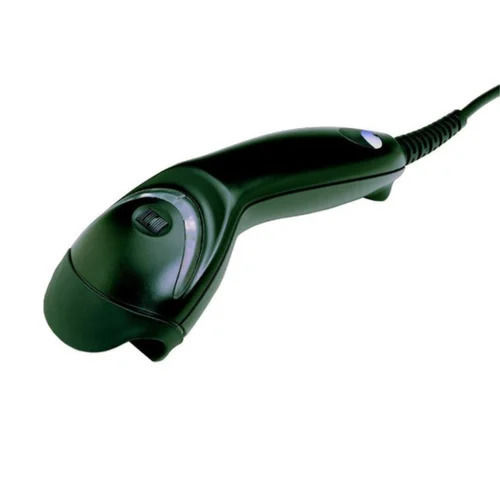
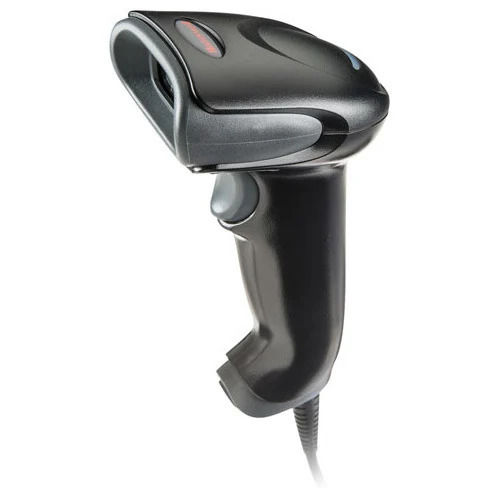
About Honeywell Eclipse 5145 1D Wired Barcode Scanner
Honeywell general purpose handheld scanners are just what businesses need for their day-to-day barcode reading applications. They are ideal scanning solutions for point of sale, inventory and asset tracking, library, tool crib, back office, and access control applications.
Minimum order quantity: 1 Piece
| Model Name/Number |
Honeywell MS5145 |
| Brand |
Honeywell |
| Scanner Type |
Laser |
| Type Of Operation |
Handheld |
| Connectivity Type |
Wired |
| Model Number |
Eclipse 5145 |
Efficient Scanning Made SimpleThe Honeywell Eclipse 5145 stands out with its user-friendly, handheld design and versatile scanning modes. CodeGate technology allows users to aim, target, and transmit data with the press of a button, making data capture exceptionally straightforward. Its lightweight build and ergonomic shape enhance comfort during prolonged use, which is ideal for high-traffic points of sale, libraries, and inventory management.
Built for Reliability and DurabilityConstructed from durable ABS plastic, this scanner is designed to accommodate rigorous daily use. Able to withstand drops from up to 1.5 meters, the Eclipse 5145 ensures consistent operation in active retail, healthcare, and office environments. Its wide operational temperature and humidity range further expand its suitability across varied working scenarios.
Flexible Connectivity for Diverse EnvironmentsOffering USB, Keyboard Wedge, and RS232 support, the Eclipse 5145 barcode scanner integrates seamlessly with most systems. This flexibility makes it suitable for a wide array of applications, including retail checkouts, stockrooms, and library counters. Its plug-and-play operation simplifies installation, minimizing downtime and technical setup requirements.
FAQ's of Honeywell Eclipse 5145 1D Wired Barcode Scanner:
Q: How do I connect the Honeywell Eclipse 5145 barcode scanner to my computer or POS system?
A: You can connect the scanner using any of its supported interfaces: USB, Keyboard Wedge, or RS232. Simply select the appropriate cable and port on your computer or point-of-sale system. The scanner is plug-and-play for most setups, allowing quick and straightforward integration without specialized drivers.
Q: What types of barcodes can the Eclipse 5145 scan?
A: The scanner is designed to read all standard 1D barcodes, including GS1 DataBar, with a resolution down to 5 mils. It is ideal for applications requiring swift and accurate scanning of items with a variety of barcode densities.
Q: When is CodeGate technology particularly useful?
A: CodeGate technology is beneficial when you need to target a specific barcode among several present. It enables users to aim at the required barcode, then transmit the data only when ready, preventing accidental scans and increasing scanning accuracy.
Q: Where can the Honeywell Eclipse 5145 be most effectively used?
A: This scanner is well-suited for environments like retail checkout counters, inventory rooms, healthcare facilities, office management settings, and libraries. Its ergonomic design and durable construction support comfortable, reliable use in busy, high-demand contexts.
Q: What is the process for switching between manual and automatic scanning modes?
A: The scanner supports both manual (triggered by pressing the button) and automatic (activated by barcodes in the field of vision) modes. Switching between modes typically involves scanning the relevant configuration barcode from the user's manual to toggle between CodeGate (manual) and CodeSense (automatic) functions.
Q: How does the scanner perform with damaged or low-contrast barcodes?
A: Thanks to its 650 nm laser and high scan speed of 72 lines per second, the Eclipse 5145 can read barcodes with as little as 35% print contrast. This capability helps capture data even from worn or poorly printed labels, minimizing scanning errors.





 Send Inquiry



 Send Inquiry
 Send Inquiry
 Send SMS